
SuperDuper DataCenter(-Tech) Blog

A deep dive into datacenter technologies like virtualization, automation, backup, and networking – bridging the gap between enterprise-grade solutions and practical implementations for SMBs and/or home labs.

VCF – Host validation error

The other day I wanted to add some additional ESXi hosts to my lab VCF installation but failed due to the following error

Host validation failed, invalid input. Please check logs for more details
You can remove the validation failed host and proceed with commissioning for the remaining hosts.

The mentioned logfile can be found inside the VCF SDDC manager appliance.

To access the logfile you first have to open an SSH session to your appliance and log in with the vcf user and the password you have set during installation.

The logfile for the host operations is stored here:

/var/log/vmware/vcf/operationsmanager/operationsmanager.log

I placed a tail -f on the logfile and retried the host validation set. In the output I found my problem, it turned out I had a typo in my DNS configuration and the host could just not be found.

java.net.UnknownHostException: esx-vcf-wld01.sddc.local: Name or service not known

After fixing DNS the host validation succeeded and the hosts could be added to the SDDC manager.

Automated Server OS installation with IPXE – part1

Several years ago we had the challenge to install more than 300 physical servers as fast as possible. As booting and installing based on PXE was not possible due to not changing external reasons we had to find a different approach. Creating a custom ISO file for every system was also no real option as it would consume a lot of disk space and would be unflexible to handle, so I needed an automated Server OS installation procedure.
Finally, I got the clearance to write this series of posts and I´m going to explain how I solved that challenge and reduced the pure installation time to only a few hours.

The interesting thing about the complete setup is the ability to install almost any OS and any device anywhere as long as you can establish a connection to a network path or share.
You can exchange the ISO file with a USB stick and run the installation that way. When you have no DHCP available, just set up your embedded IPXE script to a static ip that´s available in your network.

Managing NSX Tag(s) via RESTapi

When using NSX a quite common task is applying tags to VMs. This can be done in several ways, in this post I´m showing how to accomplish that task via the RESTapi of NSX 4.1.2

The API calls and all other scripts in this post were run with these versions:
– VMware NSX Version 4.1.2.1.0.22667789
CloudInit via VMware Aria Automation Orchestrator – Part 3

The automatic and unattended installation of virtual machines can be achieved with several techniques. In this series, I´ll show the approach of using CloudInit together with VMware Aria Automation Orchestrator. This will be realized by the use of Guest OS Customization of the specific VM.

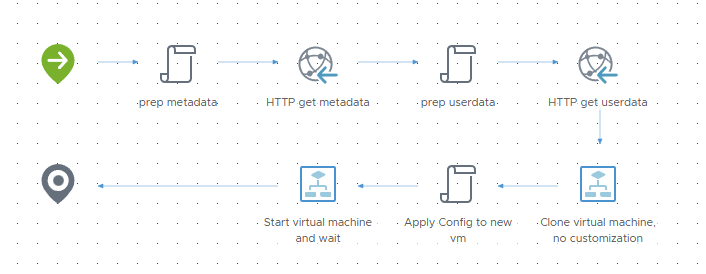
In Part 3 we´ll be finally deploying some VMs with a new designed workflow.

The deployment Workflow

Workflow Overview

CloudInit via VMware Aria Automation Orchestrator – Part 2

The automatic and unattended installation of virtual machines can be achieved with several techniques. In this series, I´ll show the approach of using CloudInit together with VMware Aria Automation Orchestrator. This will be realized by the use of Guest OS Customization of the specific VM.

In Part 2 we will focus on creating the necessary Guest OS Customization data.

Guest OS Customization

To use these Customizations we have to set Advanced Configuration parameters to each VM that should be deployed from your templates.

CloudInit via VMware Aria Automation Orchestrator – Part 1

The automatic and unattended installation of virtual machines can be achieved with several techniques. In this series, I´ll show the approach of using CloudInit together with VMware Aria Automation Orchestrator. This will be realized by the use of Guest OS Customization of the specific VM.

First, we need to prepare a VM which will be used as a template later.
To do so perform a basic installation of the OS and apply the changes for the specific OS and version.
In this post the following linux distributions are covered.

  • Ubuntu Server 22.04 LTS
  • Red Hat Enterprise Linux 9.3

Page 2 of 2

Powered by WordPress & Theme by Anders Norén